Governance
Control and traceability—built into the platform
When multiple users work with budgets, forecasts, consolidation, and reporting, it must be clear who has access to which data, who can change it, and who is responsible for approval.
PLANNORS integrates roles, access control, approvals, history, and audit trails into the platform, enabling Finance to create structure around both data and processes—without making the work unnecessarily burdensome for users.

Who can view, change, and approve what?
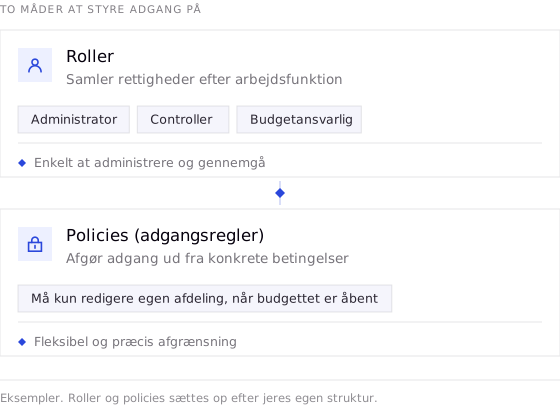
Governance is not only about access to the system. In PLANNORS, roles and permissions can control access to relevant data and functions, while approval flows create structure around approvals, and history and audit trails support control of changes.
This gives Finance a clearer basis for managing accountability and access across the organisation.
Overview
Governance in PLANNORS—from access to history
Governance should not be an extra control task alongside Finance processes. It should be part of how users work.
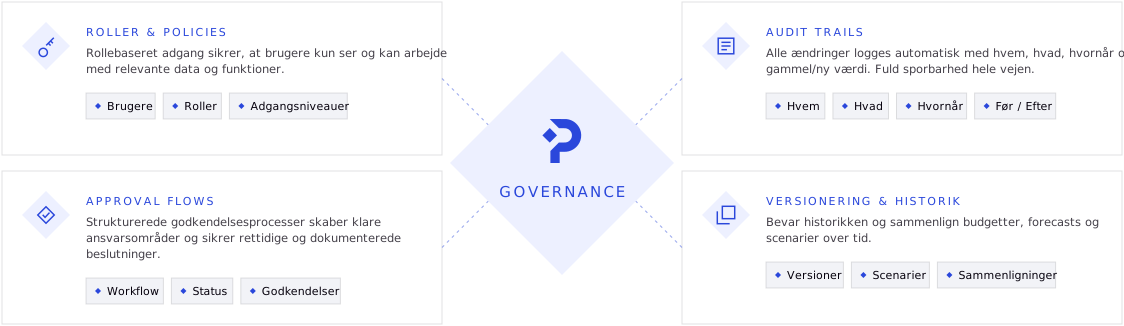
In PLANNORS, governance can be embedded from each user’s access and responsibilities through approval and subsequent history. This creates structure around who works with which data, who is accountable, what has changed, and how the process has progressed.
Roles & Policies
Control which data, functions, and processes each user can work with. Role-based access can be applied across, for example, companies, departments, cost centres, reports, and planning processes.
Users · Roles · Access levels
Approval flows
Create structured approval processes around budgets, forecasts, and other planning activities. Accountability, status, and approvals can be tracked throughout the process.
Workflow · Status · Approvals


Audit trails
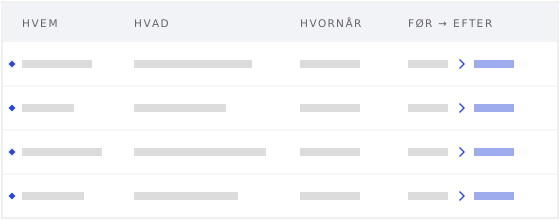
Track changes with information about who changed what and when. The audit trail provides documentation and makes it easier to understand the development from previous to current values.
Who · What · When · Before/After
Versioning & history
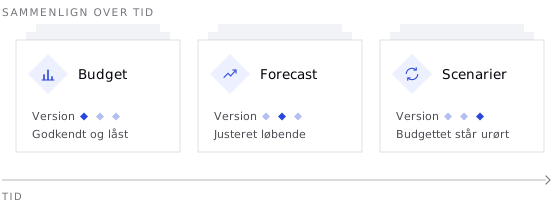
Preserve previous versions of budgets, forecasts, and scenarios, and compare developments over time. This makes it possible both to retain an approved budget and continue working with new forecasts and assumptions.
Versions · Scenarios · Comparisons
AI & GOVERNANCE
AI on Finance data requires governance
Financial data is among the company’s most sensitive information. When AI becomes part of Finance, access to data and functionality must therefore still be managed within the company’s governance.
In PLANNORS, AI is integrated into the platform and can support work such as identifying variances, understanding developments, and creating a better basis for analysis and forecasting.
This means AI does not have to be a standalone tool alongside Finance processes, but can be part of the platform where Finance already works with data, access, and governance.

THE RESULT
Governance should create control—not more administration
Governance is not an end in itself. It should enable Finance to work efficiently with the company’s financial data and processes, while access, accountability, approvals, and changes can be managed.
This creates a stronger foundation for budgeting, forecasting, consolidation, reporting, and analysis—and for introducing automation and AI into Finance in a controlled manner.

Control over access
Control who can view and work with relevant data and functions.

Clear roles and responsibilities
Create clarity around responsibilities, permissions, and approvals.

Structured approvals
Use approval flows to create structure around Finance processes.

History and audit trails
Track changes and history so Finance gains better insight into what has been changed.

More efficient workflows
Structure workflows and reduce the need for manual steps and coordination.

Governance around AI
Bring AI into Finance with access and governance as part of the foundation.
FAQ
Frequently asked questions
Four of the questions we are most often asked about governance. The rest are on the FAQ page.
Yes. PLANNORS has audit trails that make it possible to track changes and see, among other things, who made a change, what was changed, and when the change was made. This provides Finance with documentation and traceability throughout the process.
PLANNORS supports approval flows for, among other things, budgeting and forecasting. Roles, status, and responsibilities can be defined in the process, so it is clear who must provide input and who must approve.
Yes. PLANNORS preserves versions and history, so budgets, forecasts, and scenarios can be compared over time. An approved budget can thus be retained, while new forecasts and scenarios are developed based on changed assumptions.
Role-based security, audit trail, version control, Row Level Security, Single Sign-On, and Multi-Factor Authentication are included across PLANNORS editions. Approval functionality depends on the edition, where Professional supports simple approval flows, while Enterprise provides access to more advanced workflows.
Next steps
Gain control without making processes heavier
Book a demo and see how PLANNORS works with roles, permissions, approval flows, audit trails, and versioning as an integrated part of Finance processes.